
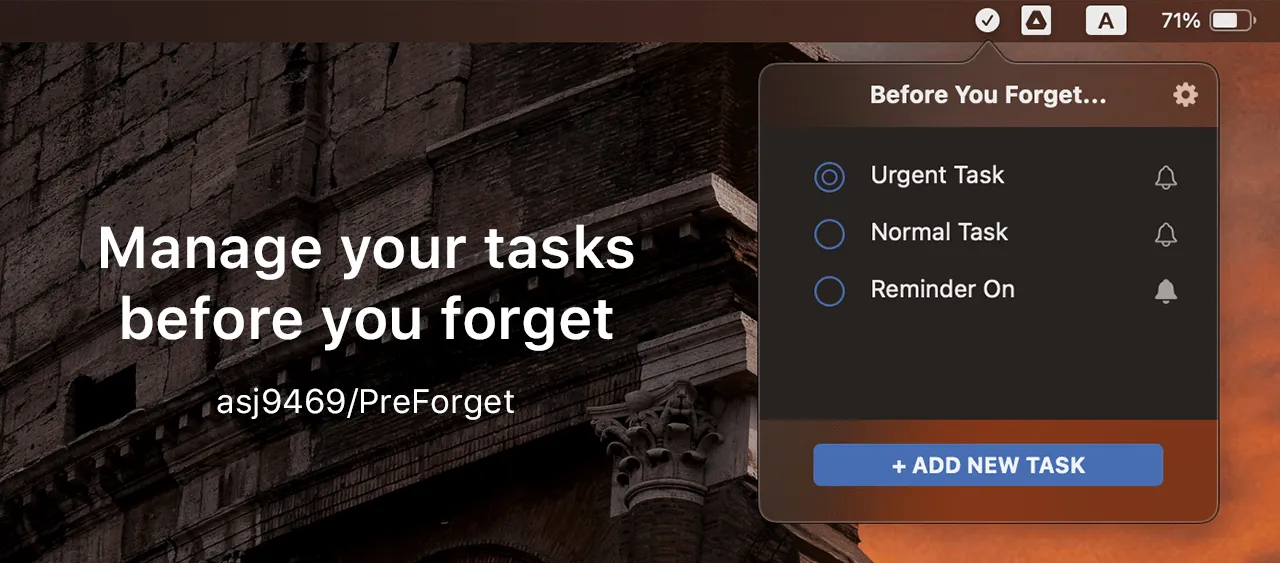
PreForget is a menu bar task management app that combines essential to-do functionality with AI-generated messages designed to keep users motivated. The app provides instant access to tasks from the menu bar with intelligent sorting based on reminder dates and urgency levels. (Free, open-source)
The interface displays tasks directly in the menu bar dropdown, eliminating the need to open a separate window for quick task review. Users can create, edit, and delete tasks with customizable reminder notifications. A notable feature is the dynamic AI-generated messages that appear during task creation and when the task list is empty, providing contextual encouragement.
Tasks support priority levels with intelligent sorting that automatically organizes items by reminder dates and urgency. The app includes a history window for accessing completed tasks, offering visibility into past accomplishments. Users can customize the theme color and set personalized images for reminder badges.
The app supports gesture-based interactions including two-finger swipe deletion for quick task management. Auto-launch on login is available for users who want persistent task access. Resource usage is minimal at approximately 2.1 MB app size.
Built with Swift and SwiftUI using Core Data for persistence, the app is fully open-source with the codebase available on GitHub. Developer Anson Goo maintains active development with planned features including CloudKit integration for cross-platform task storage and a complementary iOS app.
System requirements: macOS 13.3 or later. Available on the Mac App Store and as a downloadable application.
Privacy: The developer does not collect any user data from the application.
Limitations: No cross-device synchronization currently available. The AI message feature adds a unique element but may not appeal to users preferring minimal interfaces. Limited to macOS with no iOS companion app yet.
Alternatives: Things (comprehensive task management), Reminders (native Apple solution), Todoist (cross-platform with collaboration features).
Suitable for users who need lightweight task management with quick menu bar access and appreciate motivational reinforcement during task management workflows.


